I had a leaderboard that took four hundred milliseconds to load. Ten rows. ORDER BY score DESC LIMIT 10 on a table with maybe two hundred thousand rows, an index on the score column, nothing exotic. Four hundred milliseconds, every single request, because the query hit disk and the disk had opinions about that.
I added a five-line cache and it dropped to three milliseconds. Not a rewrite. Not a new index. Five lines, and a tool whose entire job is to keep data somewhere the CPU does not have to wait for.
That tool is usually Redis. This post is about why that works, what else is out there now, and the slightly embarrassing amount of confusion I had to work through around Redis’s license before I understood what I was actually installing.
Why disk was ever the bottleneck
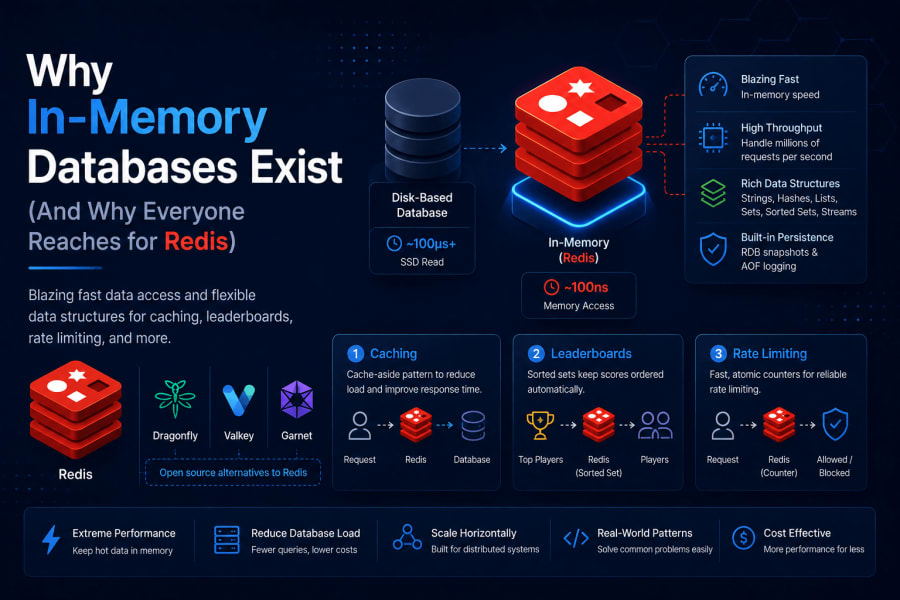
RAM access takes something like 100 nanoseconds. A read from an SSD takes somewhere around 100 microseconds. That is a thousand times slower, and that is the best case, before you add network round trips, query planning, and lock contention on a busy table.
Your database is not doing anything wrong when it is slow. It is doing exactly what a disk-backed system is supposed to do: writing to a place that survives a power outage. That durability costs time. An in-memory database skips that cost by keeping the working set in RAM and treating disk as a backup, not the primary copy.
Redis is the one most people reach for. It is a key-value store, but “key-value” undersells it. The values can be strings, hashes, lists, sets, sorted sets, or streams, and each type comes with commands built for a specific shape of problem.
The cache, which is the boring one
Here is the pattern behind that leaderboard fix, generalized. Check the cache first. On a miss, hit the real database, then write the result into the cache with an expiry.
async function getLeaderboard() {
  const cached = await redis.get("leaderboard:top10");
  if (cached) return JSON.parse(cached);

  const rows = await db.query(
    "SELECT name, score FROM players ORDER BY score DESC LIMIT 10"
  );
  await redis.set("leaderboard:top10", JSON.stringify(rows), "EX", 30);
  return rows;
}
Thirty second expiry, because a leaderboard thirty seconds stale is fine for almost anyone looking at it. The interesting part is not the code. It is deciding how stale is acceptable, because that number is the actual design decision here, not the redis.get call.
flowchart LR
    A[Request arrives] --> B{Key in Redis?}
    B -->|Hit| C[Return cached value]
    B -->|Miss| D[Query Postgres]
    D --> E[Write result to Redis with TTL]
    E --> C
This is the cache-aside pattern, and it is the one you will use more than any other. The database stays the source of truth. Redis is just the fast copy that expires.
The leaderboard, done properly
I mentioned I patched the leaderboard with a plain cache first. The better fix, once I actually needed live updates instead of a thirty-second snapshot, was a sorted set.
ZADD leaderboard 15420 "player:bob"
ZADD leaderboard 18990 "player:alice"
ZREVRANGE leaderboard 0 9 WITHSCORES
A sorted set keeps every member ordered by score automatically. No ORDER BY, no index maintenance on your end, no query at all really. ZADD when a score changes, ZREVRANGE to read the top ten. Redis is doing the sorting on every write instead of on every read, which is exactly the right trade when reads outnumber writes by a wide margin (and on a leaderboard, they always do).
Rate limiting, briefly
I wrote a full post on this one already, so I will not repeat it here beyond the shape of it: an INCR on a key like ratelimit:user:42, an EXPIRE set the first time that key is created, and a check against a threshold before the request is allowed through. The whole thing is two Redis commands and no application-level counter that has to somehow stay in sync across five app servers.
That last part is the actual point. A counter in a plain JavaScript object only knows about itself. A counter in Redis is shared state every instance of your app can see, without you writing any synchronization code.
”But it’s in memory, doesn’t that mean I lose everything on restart?”
I asked this exact question the first time someone told me to put session data in Redis. Reasonable thing to worry about.
Redis has two ways to persist to disk anyway. RDB takes a full snapshot at intervals you configure, a single compact file, fast to restore from but you lose anything written since the last snapshot if the process dies. AOF logs every write command as it happens, which gives you close to full durability (configurable down to “fsync every write”) at the cost of a larger file and a slower restart, since Redis has to replay the whole log.
Most production setups run both. AOF for the durability guarantee, RDB snapshots for a small, portable backup file you can actually ship somewhere. Redis does not force a choice, which is worth knowing before you assume “in-memory” means “gone forever if the box reboots.”
The part where the license changed three times
Now the part I got genuinely confused by. If you go looking for Redis today, you will run into Valkey, and possibly Dragonfly and Garnet too, and none of the blog posts explaining why agree on a clean one-paragraph summary. Here is my attempt at one.
Redis was BSD-licensed for its first fifteen years, the permissive kind with basically no strings attached. In March 2024, Redis Inc. switched future versions to a dual license, RSALv2 and SSPLv1, neither of which is OSI-approved open source. The practical effect was aimed at cloud providers reselling Redis as a managed service without contributing back, but it also meant Redis Community Edition technically stopped being “open source” by the strict definition.
The response was fast. Within two weeks, a group backed by AWS, Google, and the Linux Foundation forked the last BSD-licensed version and called it Valkey. Same commands, same wire protocol, genuinely BSD, no ambiguity. AWS ElastiCache and Google Memorystore both now provision Valkey by default for new clusters, not Redis.
Then in May 2025, Redis reversed course, partly credited to Salvatore Sanfilippo (the original creator of Redis, known as antirez) rejoining the company. Redis 8 shipped under a tri-license: RSALv2, SSPLv1, or AGPLv3, and AGPLv3 is OSI-approved, so Redis is arguably open source again, just under a copyleft license a lot of companies are cautious about for network-service use.
As of this year that is roughly where things sit. Redis is at 8.8, tri-licensed. Valkey is at 9.1, still plain BSD, still the default in the big managed cloud offerings. Dragonfly took a different angle entirely, a from-scratch multi-threaded rewrite that is wire-compatible with Redis commands and claims meaningfully higher throughput per node, source-available rather than fully open. Garnet is Microsoft’s entry, C#-native, aimed at teams already living in the .NET ecosystem.
None of this changes which commands you type. SET, GET, ZADD, EXPIRE work the same across all of them. It mostly matters if you are choosing what to run in production and want to know what you are agreeing to.
What I’d actually pick
For a side project or anything where the license terms genuinely do not matter to you, either Redis or Valkey is fine, and the commands are identical either way. For anything going on a managed cloud service, you will likely end up on Valkey without choosing it, since that is what ElastiCache and Memorystore hand you now. If a single node is buckling under load and you have already scaled reads as far as they go, Dragonfly is worth a real benchmark against your workload before you reach for sharding.
Where this stops being a good idea
An in-memory database is not a replacement for Postgres or MySQL. It is a fast, disposable layer in front of one. RAM costs more per gigabyte than disk, by a lot, so a dataset that comfortably lives on a $20 a month disk-backed database can get expensive fast if you try to hold all of it in Redis instead of just the hot subset. Treat it as a cache and a place for ephemeral, fast-moving state, not as your only copy of anything you cannot afford to lose.
The leaderboard loads in three milliseconds now. Nobody who uses the app knows or cares why. That is usually how it goes with the infrastructure that actually works.
References
- Redis Persistence Docs — RDB, AOF, and hybrid persistence configuration
- Redis is now available under the AGPLv3 license — official announcement of the May 2025 tri-license change
- Valkey — the Linux Foundation-backed BSD fork, source and docs