I once wrote a payment feature where two things had to happen together: debit the sender, credit the receiver. I thought about it for thirty seconds, decided the chances of the second query failing were basically zero, and moved on.
Two weeks later, a network timeout hit between the two queries. The sender’s account went down. The receiver’s account stayed the same. Nobody noticed for three days.
That is the problem transactions solve. And once you understand why they exist, the API for using them in any database or ORM starts making a lot more sense.
The problem without a concrete name
Take an online store. A customer clicks “Buy.” Your code does three things: it inserts an order row, decrements stock, and creates a payment record. Three separate queries.
If the payment query fails, you have an order with no payment. If the stock query fails, you have an order and a payment but inventory that never moved. And if your server crashes between query two and query three, you will find out about it only when the numbers stop adding up.
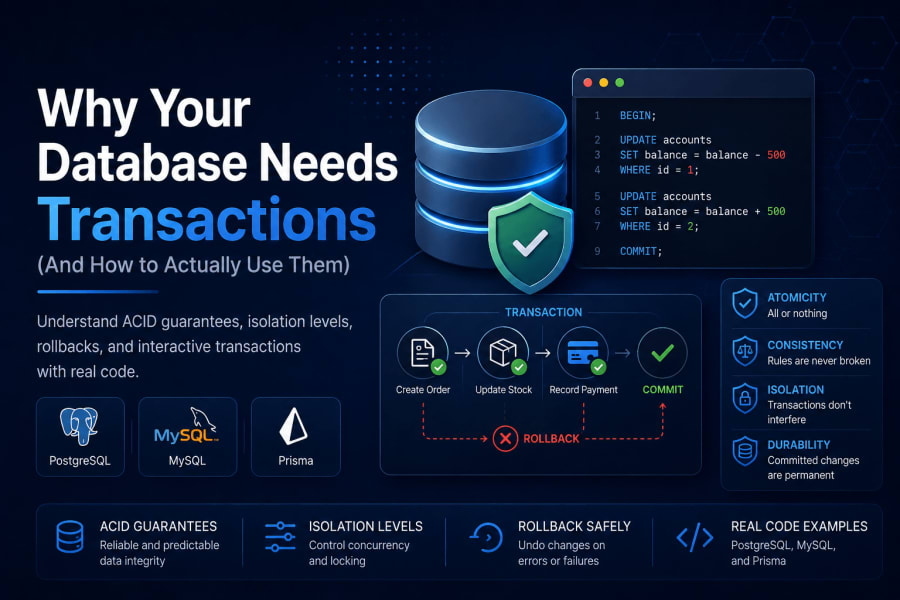
Databases have had a solution to this for decades. You wrap all three queries in a transaction, and the database treats them as a single unit. Either all three succeed and the changes become permanent, or none of them do and the database rolls back to the state it was in before any of them ran.
What ACID means in plain English
You will see the acronym ACID thrown around a lot when transactions come up. It stands for Atomicity, Consistency, Isolation, and Durability. The one that matters most day-to-day is atomicity, which is just the “all or nothing” rule I described above.
Consistency means the database will not let you commit changes that break your own rules. If you have a foreign key constraint saying every order must reference a valid user, a transaction that violates that will be rejected.
Isolation means two transactions running at the same time should not be able to see each other’s half-done work. How strictly this is enforced depends on the isolation level, which we will get to.
Durability means that once the database says a transaction committed, it stays committed. A power failure right after should not undo it. The database writes to disk and logs specifically to guarantee this.
Plain PostgreSQL
In raw SQL, a transaction starts with BEGIN and ends with either COMMIT (make it permanent) or ROLLBACK (undo everything).
Here is the money transfer example as plain SQL:
BEGIN;

UPDATE accounts
SET balance = balance - 500
WHERE id = 1;

UPDATE accounts
SET balance = balance + 500
WHERE id = 2;

COMMIT;
If something goes wrong between those two UPDATE statements, you run ROLLBACK instead:
BEGIN;

UPDATE accounts
SET balance = balance - 500
WHERE id = 1;

-- Something went wrong, undo everything
ROLLBACK;
After a ROLLBACK, the first UPDATE never happened as far as the database is concerned. The account balances are exactly where they were before BEGIN.
PostgreSQL also gives you SAVEPOINT, which lets you roll back to a specific point inside a transaction without undoing the whole thing:
BEGIN;

UPDATE orders SET status = 'processing' WHERE id = 42;

SAVEPOINT before_payment;

INSERT INTO payments (order_id, amount) VALUES (42, 99.99);

-- Payment insert failed for some reason
ROLLBACK TO SAVEPOINT before_payment;

-- The order status update is still alive, only the payment insert was undone
-- You can retry or handle the payment differently here

COMMIT;
Savepoints are useful when you have a sequence of operations where some steps are optional or retriable without starting over completely.
Plain MySQL
MySQL’s transaction syntax is almost identical. The main difference is that you need to be using a storage engine that supports transactions. InnoDB does. MyISAM does not. New tables default to InnoDB, so unless you created something explicitly with ENGINE=MyISAM, you are fine.
START TRANSACTION;

UPDATE accounts
SET balance = balance - 500
WHERE id = 1;

UPDATE accounts
SET balance = balance + 500
WHERE id = 2;

COMMIT;
You can also write BEGIN or BEGIN WORK instead of START TRANSACTION. They all do the same thing.
One thing MySQL does differently: autocommit is on by default. This means every single query you run is automatically wrapped in its own transaction and committed immediately. When you write START TRANSACTION, MySQL temporarily turns off autocommit for that session until you COMMIT or ROLLBACK. PostgreSQL works the same way.
-- Turn off autocommit for the session if you want manual control
SET autocommit = 0;

UPDATE accounts SET balance = balance - 500 WHERE id = 1;
UPDATE accounts SET balance = balance + 500 WHERE id = 2;

COMMIT;
I would not recommend managing autocommit manually at the session level in application code. It is too easy to forget to commit something and then wonder why changes are not showing up. Explicit START TRANSACTION and COMMIT keeps the intent clear.
Prisma: three ways to do this
Prisma gives you three transaction patterns. They are suited to different situations.
Nested writes
The simplest one does not even look like a transaction. When you nest related data inside a single create or update, Prisma wraps all the database writes in a single transaction automatically.
const order = await prisma.order.create({
  data: {
    userId: 1,
    total: 99.99,
    items: {
      create: [
        { productId: 5, quantity: 2, price: 49.99 },
        { productId: 8, quantity: 1, price: 0.01 },
      ],
    },
    payment: {
      create: {
        amount: 99.99,
        method: "card",
      },
    },
  },
});
The order, its items, and the payment record all get created together or not at all. You do not write a single transaction keyword. Prisma handles it.
This is the right approach when your operations map cleanly to a single model and its relations. It stops being enough when you need to make a decision based on data you read mid-operation, which is where the next pattern comes in.
Sequential transactions (batch)
If you have a set of independent queries that should all succeed or all fail, and you do not need to check results between them, you can pass an array to $transaction:
const [updatedUser, newLog] = await prisma.$transaction([
  prisma.user.update({
    where: { id: 1 },
    data: { lastLogin: new Date() },
  }),
  prisma.auditLog.create({
    data: { userId: 1, action: "login" },
  }),
]);
Both queries run inside a single transaction. If the second one fails, the first one is rolled back. The return value is an array in the same order as your input, which you can destructure directly.
This works well for fire-and-forget pairs. The limitation is that you build all the queries upfront. You cannot read a result from query one and use it to change query two.
Interactive transactions
This is the most powerful form. You pass a callback function, and Prisma gives you a tx client inside it. Every query you run through tx is part of the same transaction. You can read results, run conditional logic, and throw an error to trigger a rollback.
async function transfer(from: string, to: string, amount: number) {
  return await prisma.$transaction(async (tx) => {
    const sender = await tx.account.update({
      data: { balance: { decrement: amount } },
      where: { email: from },
    });

    if (sender.balance < 0) {
      throw new Error(`${from} doesn't have enough to send ${amount}`);
    }

    return await tx.account.update({
      data: { balance: { increment: amount } },
      where: { email: to },
    });
  });
}
The key part is that throw inside the callback triggers a ROLLBACK. Prisma catches it, rolls back every query that ran through tx, and re-throws the error so your calling code can handle it. If the callback completes without throwing, Prisma commits.
You can also configure how long Prisma will wait to start the transaction and how long it will let it run:
await prisma.$transaction(
  async (tx) => {
    // your logic
  },
  {
    maxWait: 5000,   // wait up to 5s to acquire the transaction
    timeout: 10000,  // transaction must finish within 10s
    isolationLevel: Prisma.TransactionIsolationLevel.Serializable,
  },
);
The defaults are 2000ms for maxWait and 5000ms for timeout. For operations that touch a lot of rows or have multiple round trips, bump these up, otherwise you will see timeout errors in production under load.
Isolation levels: the part nobody explains well
Two transactions running at the same time can interfere with each other in subtle ways. Isolation levels control how much interference the database allows.
The standard levels from weakest to strongest:
Read Uncommitted — one transaction can read changes another transaction made but has not committed yet. Almost never what you want. If that other transaction rolls back, you read data that never officially existed.
Read Committed — you can only read committed data. This is the default for PostgreSQL and MySQL. It prevents dirty reads but does not prevent a situation where you read the same row twice in one transaction and get different values because another transaction committed between your two reads.
Repeatable Read — once you read a row in a transaction, that row will look the same for the rest of the transaction even if someone else commits changes to it. MySQL’s default for InnoDB when you need this guarantee. PostgreSQL supports it too.
Serializable — the database behaves as if transactions ran one after another, never overlapping. The safest, and the slowest. Use it when the correctness of your logic depends on no concurrent transaction touching the same data.
For most business logic, Read Committed is fine. For financial calculations where you need consistent balances across multiple reads in one operation, Repeatable Read or Serializable is the right call.
A mistake I kept making
Early on I had a habit of wrapping everything in transactions because it felt safer. A single SELECT that only reads data. A log write that has no dependencies on anything. Background jobs that touch unrelated tables.
The problem is that transactions hold database locks. A long-running transaction blocks other queries that need to write to the same rows. In a system with any real traffic, a transaction that takes two seconds is holding locks for two seconds. That adds up fast.
The rule I follow now: wrap the minimum set of writes that need to be atomic. Do your reads first, outside the transaction if possible, and keep the transaction window as short as you can. Move any slow operations (sending emails, calling external APIs, generating reports) outside the transaction entirely.
For Prisma interactive transactions specifically, do not put API calls or file writes inside the $transaction callback. If the external call takes 10 seconds, your transaction holds locks for 10 seconds. Read what you need, close the transaction, then do the side effects.
What rollback actually does
One thing that trips people up: ROLLBACK does not undo things that happened outside the database. If your transaction inserted a row and then sent an email confirming the order, and then the commit failed and you rolled back, the row is gone but the email is already delivered.
This is why the pattern of “do everything in the transaction, then do side effects after commit” matters. The database guarantees the transaction. Everything else is your responsibility to sequence correctly.
A common approach for things like emails or webhook calls: write to an outbox table inside the transaction, then have a separate job process the outbox after the transaction commits. The outbox row only exists if the transaction committed, so your side effects are always in sync with your database state.
Checking if your tables actually support transactions
One last thing worth verifying if you are on MySQL and working with an older database. Run this to confirm your tables use InnoDB:
SELECT table_name, engine
FROM information_schema.tables
WHERE table_schema = 'your_database_name';
Any table showing MyISAM will silently ignore your transaction commands. A ROLLBACK against a MyISAM table does nothing, which is one of those bugs that is very hard to notice until it causes data corruption. If you find any, ALTER TABLE your_table ENGINE=InnoDB; converts them.
References
- Prisma Transactions Guide — covers sequential, nested writes, and interactive transactions with all options
- PostgreSQL Transaction docs — BEGIN, COMMIT, ROLLBACK, and SAVEPOINT explained with examples
- MySQL InnoDB Transaction Model — isolation levels, locking, and autocommit behaviour