I shipped a project to production about two years ago with the version number 1.0.0 in the package.json. Six months later it was still 1.0.0. We had done maybe forty releases by that point. Fixed a dozen bugs, added three significant features, quietly broke the API twice and fixed it without telling anyone.
The version number was lying.
That is where most people are when they start thinking about this stuff. Not because they are careless, but because version numbers feel like formality. A badge you slap on before shipping. Something the compiler needs. Nobody told you the number was supposed to carry information.
What the three numbers actually mean
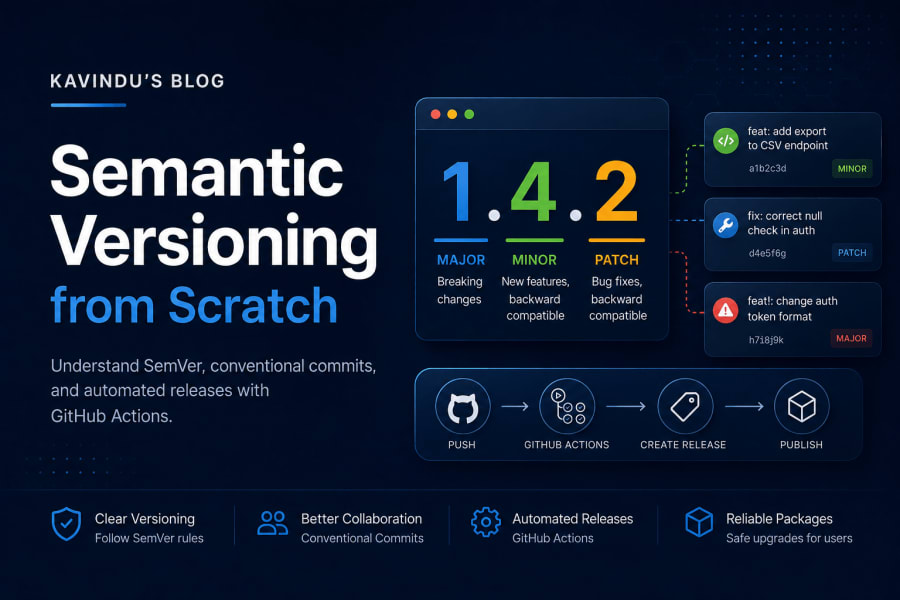
The three numbers in MAJOR.MINOR.PATCH each mean something specific: PATCH goes up for a bug fix, MINOR goes up when you add a feature without breaking anything, and MAJOR goes up when you break something callers depend on. You have seen the format everywhere. 1.4.2, 3.0.0, 0.12.7. The spec behind it is called Semantic Versioning, published at semver.org, and the rules are short enough to memorize.
Patch goes up when you fix something that was broken. The code does the same job it always did, just correctly now.
Minor goes up when you add something new without breaking what already existed. Code that worked against version 1.3.0 still works against 1.4.0.
Major goes up when you break something that worked before. If someone’s code calls your API and you change the response shape, that is a major bump. If you rename a function, that is a major bump. Anything that forces callers to update their own code is a major bump.
One more thing: 0.x.x is special. When the major version is zero, the spec says anything can change. You are in development mode and compatibility guarantees do not apply. Once you ship 1.0.0, you are making a contract.
Why any of this matters
Here is the practical reason: package managers use version numbers to decide what to install and upgrade automatically, trusting that a minor or patch bump won’t break your code without you having to check every changelog by hand.
When a package.json says "express": "^4.18.0", the caret means “give me anything that is 4.x.x where x is at least 18”. That works because the semver contract says minor and patch upgrades cannot break your code. If express ships 4.19.0, you get it automatically. If they ship 5.0.0, you do not, because that could mean breaking changes.
If version numbers are made up, the whole dependency resolution system falls apart. Your users cannot safely upgrade. Automated dependency bots open PRs that might silently break production. Someone writes code against your 1.3.0 API, you ship 1.4.0 with a renamed function (which should have been 2.0.0), and now their build is broken and they do not know why.
The version number is a communication tool. When you use it correctly, you are talking to every tool and every person that depends on your code.
Commit messages are version notes in disguise
Once you accept that version bumps should carry meaning, the question becomes: where does that meaning come from? You cannot manually read every diff and decide if it is a patch, minor, or major. Or rather, you can, but you will make mistakes and it will not scale.
The answer is commit messages. Specifically, a format called Conventional Commits.
The format looks like this:
type(scope): subject

optional body

optional footer
The type is the important part:
fix: something→ patch releasefeat: something→ minor releasefeat!: somethingor aBREAKING CHANGE:footer → major release
So a commit that reads fix: correct null check in user auth tells the versioning tool: this is a patch. A commit that reads feat: add export to CSV endpoint says: minor. A commit that reads feat!: change auth token format with an exclamation mark after the type says: major, someone downstream is going to need to update their code.
The other types you will see are docs, chore, style, refactor, perf, test. These are informational. They describe what happened but do not by themselves trigger a version bump. Whether they do or not depends on how you configure your tools, which we will get to.
The important mental shift is this: writing a good commit message is not a ceremony you perform for your future self when reading git log. It is input data that your release pipeline reads to decide what version to publish.
Before automation: tagging by hand
You do not need any tools to do this. Git has had tagging since forever.
After you finish a set of changes and you decide this is 1.4.0:
git tag -a v1.4.0 -m "Release v1.4.0: add CSV export and fix auth null check"
git push origin v1.4.0
The -a flag creates an annotated tag, which has metadata (who tagged it, when, the message). Annotated tags are better than lightweight tags for releases because the metadata matters later.
To see your tags:
git tag -lTo see what changed between two tags:
git log v1.3.0..v1.4.0 --onelineThis is fine for small projects with one person shipping. The problem is that you have to remember to do it, remember to decide the right version, remember to push the tag separately from the code, and write release notes by hand. None of that scales.
The packages that automate it
The npm ecosystem has a library called semantic-release that reads your git history, decides the next version based on commit types, creates the tag, generates a changelog, and publishes a GitHub release. All of it automatic.
These are the packages you will almost certainly need:
# The core tool
pnpm add -D semantic-release

# Reads commit messages and decides patch/minor/major
pnpm add -D @semantic-release/commit-analyzer

# Generates the release notes / changelog text
pnpm add -D @semantic-release/release-notes-generator

# Writes a CHANGELOG.md file
pnpm add -D @semantic-release/changelog

# Updates package.json version
pnpm add -D @semantic-release/npm

# Creates the GitHub release with the notes
pnpm add -D @semantic-release/github

# Commits files back (package.json, CHANGELOG) after release
pnpm add -D @semantic-release/git

# Run your own shell commands at release time (optional but useful)
pnpm add -D @semantic-release/exec
You do not need all of them every time. A private project that is not published to npm still benefits from @semantic-release/github for the release notes. A published npm package needs @semantic-release/npm. A project that writes a CHANGELOG.md needs @semantic-release/changelog. Start with what you actually need.
The config file
Create release.config.json at the root of your project. This is the file that tells semantic-release what plugins to use and how to behave.
Here is a minimal setup for a project that does not publish to npm but does want a GitHub release:
{
  "branches": ["main"],
  "plugins": [
    [
      "@semantic-release/commit-analyzer",
      {
        "preset": "angular",
        "releaseRules": [
          { "type": "docs",     "release": false },
          { "type": "chore",    "release": false },
          { "type": "style",    "release": false },
          { "type": "refactor", "release": "patch" },
          { "type": "perf",     "release": "patch" },
          { "type": "fix",      "release": "patch" },
          { "type": "feat",     "release": "minor" }
        ]
      }
    ],
    "@semantic-release/release-notes-generator",
    ["@semantic-release/npm", { "npmPublish": false }],
    "@semantic-release/github",
    [
      "@semantic-release/git",
      {
        "assets": ["package.json"],
        "message": "chore(release): ${nextRelease.version} [skip ci]\n\n${nextRelease.notes}"
      }
    ]
  ]
}
A few things worth explaining. The releaseRules array is where I deviated from the defaults. By default, refactor and perf commits do not produce a release at all. I changed that to patch, because if I took the time to refactor something, I want it shipped and tagged. docs, chore, and style still produce nothing.
The npmPublish: false tells the npm plugin to update package.json with the new version but not actually push anything to the npm registry. This is useful for apps and internal tools.
The [skip ci] in the git commit message is important. When semantic-release commits the updated package.json back to the repo, it triggers another CI run. That [skip ci] tag tells GitHub Actions to ignore that commit. Without it you get an infinite loop of releases triggering CI triggering releases.
The GitHub Actions workflow
This is where it all connects. On every push to main, the workflow runs semantic-release, which decides if there is anything to release and handles it.
name: CI/CD

on:
  push:
    branches: [main]
  workflow_dispatch:

permissions:
  contents: write       # create tags, releases, version-bump commits
  issues: write         # comment on referenced issues
  pull-requests: write  # comment on merged PRs

jobs:
  release:
    name: Semantic Release
    runs-on: ubuntu-latest
    outputs:
      released: ${{ steps.release.outputs.new-release-published }}
      version: ${{ steps.release.outputs.new-release-version }}

    steps:
      - uses: actions/checkout@v4
        with:
          fetch-depth: 0        # ← critical: needs full git history

      - uses: actions/setup-node@v4
        with:
          node-version: 22

      - uses: pnpm/action-setup@v4
        with:
          version: latest

      - name: Install dependencies
        run: pnpm install --frozen-lockfile

      - name: Release
        id: release
        env:
          GITHUB_TOKEN: ${{ secrets.GITHUB_TOKEN }}
        run: pnpm exec semantic-release

  deploy:
    name: Build & Deploy
    runs-on: ubuntu-latest
    needs: release
    if: always()           # ← deploys even if no new release

    steps:
      - uses: actions/checkout@v4
        with:
          ref: main

      - uses: actions/setup-node@v4
        with:
          node-version: 22

      - uses: pnpm/action-setup@v4
        with:
          version: latest

      - name: Install dependencies
        run: pnpm install --frozen-lockfile

      - name: Build
        run: pnpm run build

      - name: Deploy
        # ... your deploy step here
The fetch-depth: 0 on the checkout step is the thing people miss most often. By default, actions/checkout does a shallow clone with only the latest commit. Semantic-release needs the full history to figure out what has changed since the last tag. Without fetch-depth: 0, it sees no history, cannot find previous tags, and either fails or bumps incorrectly.
The two jobs are chained with needs: release. The deploy job has if: always() so that if this push did not trigger a version bump (say, it was a docs commit), the deploy still happens. You want the site to update even for commits that do not produce a new release.
The released and version outputs from the release job are available to the deploy job if you need them. You could, for example, skip a deploy if released == 'false'. In this case I do not, but it is useful if deployment is expensive.
Branch-based release channels
Single-branch setups work fine for simple projects. But once you have a staging environment or you want to test releases before they go to production, you want branches to map to release channels.
The setup I use for my portfolio site has two branches:
{
  "branches": [
    { "name": "main",    "prerelease": false },
    { "name": "staging", "prerelease": "rc"  }
  ],
  "plugins": [
    "@semantic-release/commit-analyzer",
    "@semantic-release/release-notes-generator",
    ["@semantic-release/changelog", { "changelogFile": "docs/CHANGELOG.md" }],
    [
      "@semantic-release/exec",
      {
        "prepareCmd": "echo ${nextRelease.version} > VERSION && npm run build"
      }
    ],
    "@semantic-release/git",
    [
      "@semantic-release/github",
      {
        "assets": ["docs/CHANGELOG.md"]
      }
    ]
  ]
}
When you push commits to staging, semantic-release creates a prerelease version like 1.5.0-rc.1. Push more commits, it becomes 1.5.0-rc.2. When you merge staging into main, it creates the final 1.5.0 release.
This is useful for a few reasons. You can send staging to your test environment and have your QA team bang on 1.5.0-rc.1 before it ever goes to production. If something breaks, you fix it on staging, get 1.5.0-rc.2, test again. If it all looks good, one merge to main produces the clean release.
The flow looks like this:
flowchart LR
    A([main]) --> B[feat: add export]
    B --> C{branch staging}
    C --> D["fix: edge case\n🏷️ v1.5.0-rc.1"]
    D --> E["fix: another edge\n🏷️ v1.5.0-rc.2"]
    E --> F{merge → main}
    F --> G["🏷️ v1.5.0\n✅ production release"]
    G --> H([next cycle])
The staging branch is not a long-lived branch you maintain forever. It is a buffer between your working commits and a production release. You can also call it beta, next, or whatever fits your team’s vocabulary. The name in the config is just a string.
What the git history looks like after this runs
Once semantic-release runs, your git history barely changes: it just gains one new commit the tool adds on its own, something like chore(release): 1.2.0 [skip ci], sitting on top of your feat and fix commits and pointing at the freshly created version tag. After semantic-release runs for the first time on a project at 1.1.1 where you have added a feature:
* chore(release): 1.2.0 [skip ci]    ← semantic-release committed this
* feat: add search to posts page       ← your commit
* fix: correct broken pagination link  ← your commit
* chore(release): 1.1.1 [skip ci]    ← previous release
The tag v1.2.0 points to that first commit. GitHub creates a release named v1.2.0 with generated release notes that list your feature and fix commits, linked to the actual commits. The package.json in the repo now reads "version": "1.2.0".
You did none of that manually.
A few things that trip people up
The first release. If your repo has no tags yet, semantic-release needs to know where to start. The default is 1.0.0. If you already have code in production and want to start at a different number, create the first tag manually: git tag v2.0.0 && git push origin v2.0.0. From that point semantic-release will increment from there.
The token. Semantic-release needs to write back to the repo (commit the updated package.json, create the tag and release). The built-in GITHUB_TOKEN works for most cases if you set the right permissions in your workflow. For some advanced scenarios (like pushing tags that trigger other workflows), you need a personal access token. The PAT goes in your repository secrets and you pass it as GITHUB_TOKEN in the env block.
The [skip ci] loop. Mentioned this above but it is worth repeating. The version-bump commit that semantic-release pushes will re-trigger your CI workflow. The [skip ci] tag in the commit message is how you tell GitHub Actions not to run on that commit. Without it, you will watch your Actions tab spin in circles.
Merge commits. If you merge PRs via GitHub’s merge button with the default merge commit message (Merge pull request #42 from user/branch), semantic-release will not parse that as a releasable commit. The actual release-triggering commits are the ones inside the PR. This is usually fine. If you squash-merge, you need the squash commit message to follow conventional commits format, otherwise nothing will release from that PR.
Running it locally to check
Before you wire this to CI, you can run semantic-release in dry-run mode to see what it would do:
GITHUB_TOKEN=your_token npx semantic-release --dry-runIt will tell you what the next version would be and why, without actually creating anything. Useful for sanity-checking your config and your commit history before the first real run.
Where to go from here
The setup described here will handle most projects indefinitely. The main things people add later are:
Monorepo support. If your repo has multiple packages, semantic-release has a separate tool called multi-semantic-release that handles running releases for each package independently based on what changed.
Slack or Discord notifications. The @semantic-release/exec plugin can run any shell command, including a curl to a webhook. You can fire off a message to your team channel every time a new version ships.
Publishing to npm. If your project is actually a library, swap npmPublish: false for npmPublish: true in the npm plugin config, make sure your NPM_TOKEN is in your repository secrets, and add it to the env block alongside GITHUB_TOKEN. Semantic-release will push to the registry and create the GitHub release in the same run.
The version number in package.json is a small thing. But once your pipeline manages it automatically, you stop thinking about it entirely, and that turns out to be worth a lot.
References
- Semantic Versioning 2.0.0 — the full spec, short enough to read in ten minutes
- Conventional Commits — the commit message format that feeds into automation
- semantic-release docs — configuration reference, plugin list, CI setup guides