I said I’d write this one next, in the last post. Then six weeks went by, a second customer actually signed a contract, and I found out how much of my “architecture” was theory until someone other than me had data sitting in that cluster.
Provisioning the second tenant took about four seconds of SQL and finished without me watching. The part that actually worried me was everything downstream of that, would the app know which database to talk to, would a migration I pushed for tenant one silently skip tenant two, would twenty connections per tenant times a handful of tenants quietly eat the connection limit on a single-node Postgres cluster I’d already committed to in the last post. None of that is the SQL’s problem. All of it is the part nobody mentions when they say “just give each tenant their own database.”
Why one database per tenant, not one shared table with a tenant_id column
A dedicated database per tenant means no query, migration, or application bug can ever return another tenant’s rows, because the rows physically don’t exist in the same database to begin with. A shared schema with a tenant_id column on every table relies on every single query remembering to filter by it, forever, including every migration and every ad-hoc script anyone ever runs against that schema.
I didn’t pick this because shared-schema is a bad pattern in general, plenty of serious multi-tenant SaaS products run it fine with row-level security doing the enforcement. I picked it because this app handles data where “we accidentally forgot a WHERE tenant_id = clause in a hotfix” isn’t an acceptable failure mode to even be possible. A separate database turns that whole class of bug into one that literally cannot compile into a leak, because the connection the buggy query runs on was never pointed at the other tenant’s data in the first place.
The honest tradeoff is operational, not architectural. One tenant is one CREATE DATABASE, one Postgres role, one line in a migration loop, and eventually one more set of connections against the same max_connections ceiling. That bill comes due later in this post.
Provisioning a tenant is four SQL statements, not a Kubernetes CRD
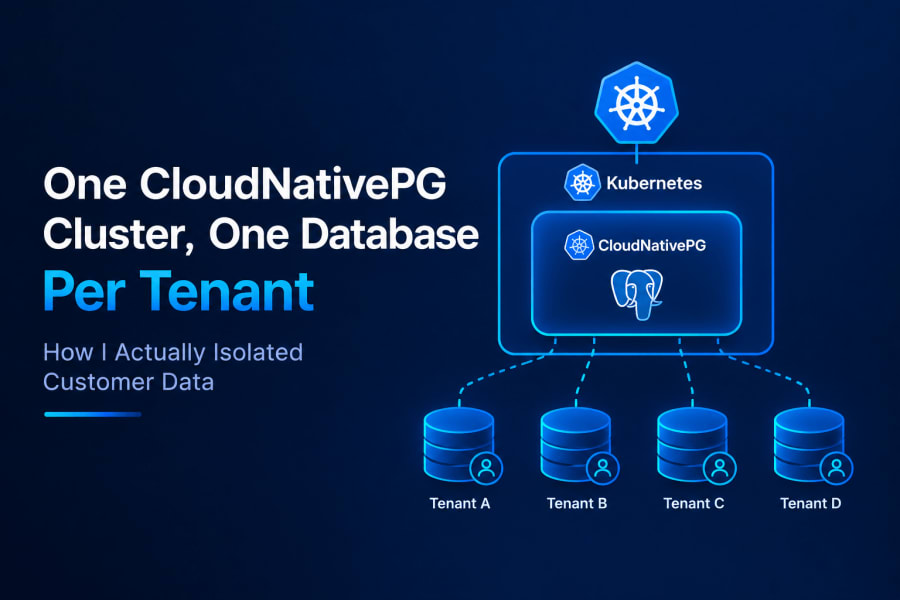
New tenant databases get created by the application itself running plain SQL against the cluster, there’s no Database custom resource or GitOps step involved, CloudNativePG only provisions the one shared cluster everything else lives inside. The app connects as a dedicated admin role that can create databases and roles but isn’t a superuser, and runs roughly this:
CREATE ROLE "t_acme" LOGIN PASSWORD '...' NOSUPERUSER NOCREATEDB NOCREATEROLE NOINHERIT CONNECTION LIMIT 20;
CREATE DATABASE "tenant_acme" OWNER "t_acme";
REVOKE ALL ON DATABASE "tenant_acme" FROM PUBLIC;
That’s the whole provisioning primitive. Each tenant gets its own login role, owning exactly one database, with nobody else granted so much as the ability to open a connection to it. The slug (acme here, obviously standing in for a real tenant name) gets validated down to [a-z0-9-] before any of this runs, because it ends up inside an unquoted identifier and I’d rather reject a weird tenant name up front than find out what happens when one lands in a CREATE DATABASE statement.
CREATE DATABASE can’t run inside a transaction in Postgres, which means if the role creation succeeds and something after it fails, I can’t just roll back. The provisioning code has to explicitly DROP DATABASE ... WITH (FORCE) and drop the role by hand on any failure partway through, same as it does for any other kind of cleanup where the happy path and the undo path aren’t symmetric.
Schema gets applied to the new database right after, and then a background job seeds default data and creates the tenant’s first user, all tracked through a job row so the API that kicked this off can return immediately instead of making an HTTP request wait on however long schema setup takes.
Picking the right database per request without rewriting every query
Every incoming request resolves to a tenant first (from a header or subdomain, looked up once and cached), and that tenant’s connection details then ride along with the request through the rest of the call stack without every function having to accept and pass a tenantId argument. In Node.js this is AsyncLocalStorage, request-scoped context that’s readable from anywhere further down the call chain without threading it through every function signature by hand.
The actual database client per tenant is built lazily and cached, the first request for a tenant pays the cost of opening a connection, every request after that reuses the cached client until it’s been idle long enough to get swept and disconnected. This matters more than it sounds like it should, because building a fresh database client on every single request would mean the connection overhead scales with request volume instead of with tenant count, and those are very different numbers once you have real traffic.
The part that made this actually usable day to day is that the feature code underneath never has to know any of this exists. It injects “the database client” like it always did and calls methods on it like normal, a thin layer underneath intercepts that access, checks which tenant the current request belongs to, and forwards the call to that tenant’s cached client. Nobody writing a feature has to remember multi-tenancy is happening, which is really the only way you get this right across a codebase with more than one person touching it.
flowchart TD
    Request[Incoming request]
    Resolve[Resolve tenant from header/subdomain]
    Context[Per-request context carries tenant]
    Cache{Client cached for this tenant?}
    Build[Build and cache new client]
    Use[Use cached client]
    DB[(Tenant's own database)]

    Request --> Resolve --> Context --> Cache
    Cache -->|no| Build --> DB
    Cache -->|yes| Use --> DB
One connection detail is deliberately kept out of the shared cache: the decrypted connection string itself lives only in the process’s own memory with a short lifetime, not in whatever shared cache is backing the tenant lookup. The tenant-to-connection-info mapping can live somewhere shared and slower, the plaintext credentials that mapping decrypts to shouldn’t.
Running the same migration across every tenant database
A schema change doesn’t apply itself to twenty tenant databases just because it applied to one, so the fleet-wide rollout is its own explicit step that loops over every tenant and applies the same schema change to each one’s database in turn. Each tenant row keeps a stamped schema version, and any tenant whose stamp doesn’t match the current version shows up as outdated until something runs the migration against it specifically.
Whether that loop runs automatically on every deploy or waits for a human to trigger it is a real design decision, not a default you get for free, and I’ve seen both work. Automatic fleet-wide migration as a pre-deploy step means nobody forgets a tenant, but it also means a bad migration touches every customer’s data in one shot before anyone’s looked at the result. Human-triggered migration, run against one tenant, checked, then run against the rest, is slower and means you can genuinely forget a tenant if you’re not watching the “outdated” list, but a bad migration only ever touches the one you tested it on first.
I went with the second one for this app, because the data in these tenant databases is the kind where a schema change gone sideways on all of them simultaneously is a worse Tuesday than a slightly slower rollout. If your tenant count gets into the hundreds, the human-in-the-loop version stops being realistic and you probably want the automatic path with very good staging coverage instead. There isn’t a universally correct answer here, there’s just which failure mode you’d rather be debugging at 2am.
How many tenant databases one Postgres instance can actually hold
This is a connection-count problem long before it’s a disk or CPU problem, since the cap on simultaneous connections to one Postgres instance is a single number (max_connections) shared across every tenant database living on it. Each tenant role gets its own hard CONNECTION LIMIT at the Postgres level, in my case 20, which exists specifically so one busy tenant can’t eat every available connection slot and starve the others, Postgres enforces this itself regardless of what the application does.
The math that actually matters is: number of active tenants, times whatever connection pool size each tenant’s app-side client holds open, plus the control-plane database’s own connections, all of it has to stay comfortably under max_connections. Run that number forward and it tells you exactly how many tenants one instance can hold before you need to either raise max_connections, shrink per-tenant pool sizes, or put a connection pooler like PgBouncer in front of the whole thing. I haven’t added PgBouncer yet, because I haven’t hit that ceiling yet, and adding a pooler before you need one just adds a thing that can break for no benefit.
There’s a real catch if you do add a transaction-mode pooler later though: things like pg_dump, schema migrations, and anything that needs to hold a session open across multiple statements don’t work through transaction-mode pooling, since the pooler can hand your next statement to a completely different backend connection mid-session. Whatever path runs backups and migrations has to keep going straight to Postgres even after a pooler is sitting in front of regular request traffic.
What stops one tenant’s database from touching another’s
The database-level boundary holds because each tenant’s role owns only its own database and every other role, including other tenants’ roles, has had CONNECT revoked on it. REVOKE ALL ON DATABASE "tenant_acme" FROM PUBLIC right after creation closes the default Postgres behavior of granting CONNECT to PUBLIC on every new database, the same gap I closed on the control-plane database itself in the first post. Without that line, tenant Bob’s role could still open a connection to tenant Acme’s database even though it owns nothing in it, which isn’t exploitable on its own but isn’t a boundary I want sitting open either.
There’s no row-level security and no shared-schema tenant column anywhere in this design, isolation is entirely at the object level, separate database, separate owning role, nothing else needed to enforce it. That’s a stronger guarantee than RLS in the sense that there’s no policy to misconfigure or forget to attach to a new table, and a weaker one in the sense that you now have N databases and N roles to actually manage instead of one schema with a column. I’d make the same call again for this app. I wouldn’t necessarily make it for one with thousands of tenants, at that scale the operational weight of N databases starts mattering more than it does at a dozen.
What still doesn’t scale perfectly
Disk isn’t actually quota-enforced per tenant, the storage class backing this cluster is a directory on the node’s own disk, not a hard allocation, so the size I request in the Cluster spec is a request, not a ceiling. One tenant with a runaway table can, in theory, fill the node before any per-tenant limit would ever catch it, since there isn’t a per-tenant limit on disk the way there is on connections.
Restoring one damaged tenant without touching the others means restoring the whole cluster into a temporary instance and then pulling just that tenant’s database back out of it, because the backup is per-cluster and covers every tenant’s data in one base backup plus WAL stream. That’s slower than a hypothetical per-tenant restore would be, but it also means I’m not running N independent backup jobs and N independent retention policies for N tenants, which is its own kind of operational weight I’m not ready to take on yet.
Neither of those is a surprise, exactly, they’re the same honest tradeoffs as running a single-instance cluster with no automatic failover, which I already owned up to in the last post. More tenants makes both of them matter sooner.
The second tenant’s data has been sitting in its own database for a few weeks now, next to the first tenant’s, on the same cluster, and neither one has ever seen a row that belongs to the other. That’s really the only claim this whole setup has to be able to back up.
References
- PostgreSQL: CREATE ROLE — role privileges,
CONNECTION LIMIT,NOINHERIT - PostgreSQL: Managing Databases —
CREATE DATABASE, defaultPUBLICprivileges, per-database settings - CloudNativePG: Connection Pooling — the
PoolerCR for running PgBouncer in front of a cluster, transaction vs session pooling